
What It Costs to Make AI Videos With Separate Tools, and With One Subscription
Clipping, captions and AI voice each have a monthly plan. What three of them cost in October 2026 next to one Clip-Short Pro plan, and what to check first.
A short video made with AI rarely comes from one tool. One app cuts the long video into clips. Another adds the animated captions. A third writes the voice. A fourth draws the pictures. Each one bills you every month, and each plan counts something different.
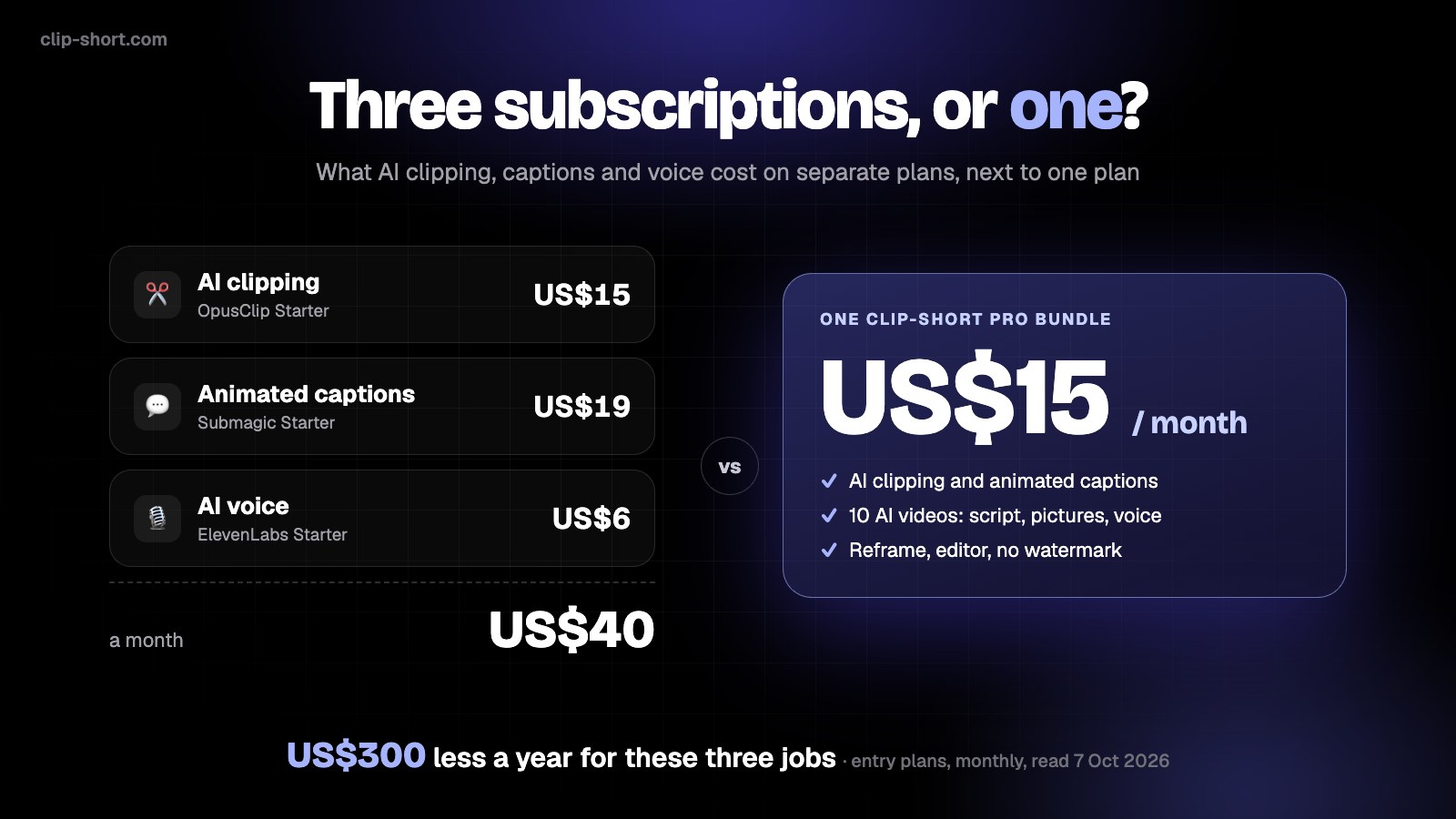
We added up three popular single-job tools from their own pricing pages and put them next to one Clip-Short Pro bundle. Here is the bill, and a calculator for yours.
The three separate plans
These are entry paid plans, billed monthly, in US dollars, read on each company's pricing page on 7 October 2026. Prices change, and every company discounts a year paid up front, so check the page before you decide.
| Job | Tool and plan | A month | What the page says it includes |
|---|---|---|---|
| AI clipping | OpusClip Starter | US$15 | Faster processing than the free plan, 3 AI B-roll and 3 stock B-roll clips a month, 20 AI voice-overs a day |
| Animated captions | Submagic Starter | US$19 | 15 videos a month, each up to 2 minutes |
| AI voice | ElevenLabs Starter | US$6 | 30,000 credits a month, about 1 credit per character of speech |
| Together | US$40 | US$480 a year, for three jobs |
A tool for faceless videos and one for AI images would each add a plan of their own on top. Over a year the gap keeps growing:
A year of bills
What you have paid after each month
- Three separate plansUS$480
- Clip-Short Pro, monthlyUS$180
- Clip-Short Pro, paid yearlyUS$100
One bundle against the three entry plans read on 7 October 2026. Paying any of them yearly lowers its line too.
Put in your own bill
Your stack is not ours. Untick what you do not use, type what you really pay, add the tools we left out, and switch Clip-Short to yearly billing to see the year price.
Calculator
Your bill, against one plan
Untick what you do not pay for, type your real prices, or add a tool.
- AI clipping (OpusClip Starter)
- Animated captions (Submagic Starter)
- AI voice (ElevenLabs Starter)
US$300 less a year with one plan
Clip-Short Pro: US$15 a month per bundle, or US$100 a year per bundle. The other prices are entry plans billed monthly on 7 October 2026; change them to yours.
What one Clip-Short bundle includes
One bundle costs US$15 a month, or US$100 for a year. Need more? Add bundles: everything in the plan scales with them.
One bundle, US$15 a month
🎃 This month: subscribe and get 5 extra AI videos right away, on top of the plan.
The free plan makes 1 AI video a month of up to 1 minute with a small watermark, and 60 minutes of clipping and captions: enough to try the whole path first.
Same price tag, different units
The headline number is the easy part. Each tool counts a different thing, so a fair comparison starts with what you make in a month.
Read the limits, not only the price
Each tool counts a different thing
OpusClip Starter
counts processing, B-roll and voice-over limits
3 AI B-roll clips and 3 stock B-roll clips a month, 20 AI voice-overs a day
Their pricing pageElevenLabs Starter
counts credits
30,000 credits a month, about 1 credit per character of speech
Their pricing pageClip-Short counts two things: hours of video processed (clipping, captions, reframing) and AI videos made. Compare what you make in a month, not the units.
Some honest limits of this comparison:
- It compares entry plans. If you need a bigger plan of any tool, its price goes up. So may ours: you can buy more than one bundle.
- We did not read every limit. The OpusClip page we read does not list the processing minutes of its Starter plan.
- Specialists can do one job better. A tool built only for voices may have more voices and more control than ours. If you need that, the extra plan is money well spent.
For clippers: the cost that grows is time
If you make clips from long videos, the subscription is the small cost. The big one is the time you spend finding the moment, cutting it, turning it vertical, adding captions and fixing the words, for every clip. AI Clipping does the cut and the captions in one place, and you fix what is wrong in the clip editor. Because clipping, captions and reframing share one bundle of processing hours, you do not pay again for captions on every clip.
Move the sliders to your own numbers:
For clippers
The cost that grows is time
Your own guesses: how long one clip takes you by hand, and with AI doing the cut and the captions.
29 hours back a month
Arithmetic on your numbers, not a measurement: (minutes by hand − minutes with AI) × clips a week × 4.33 weeks.
If you clip other people's videos, read our guide to starting a clips channel first: the creator's permission does not decide whether YouTube pays you. For a rough idea of what clipping pays, try the clipping earnings calculator.
For faceless videos: one idea, one tool
A faceless video from a topic needs a script, pictures, a voice and captions. With separate tools that is four plans before you edit anything. In Clip-Short the AI video agent does all four from one idea, and you can change any scene before you export. Each video uses one of the bundle's 10 AI videos a month.
Before you compare, check these
Before you compare
0 of 5The video tool cost calculator has more tools in it if your stack is bigger than three.
Try it before you pay
Make a video from an idea or clip a long video on the free plan, then see the plans in your own currency.
Sources
These are the pricing pages we read on 7 October 2026:
- OpusClip: https://www.opus.pro/pricing
- Submagic: https://www.submagic.co/pricing
- ElevenLabs: https://elevenlabs.io/pricing
More you can make
Free AI video generator
What the free plan includes: an AI video every month, no card.
OpenAI story videos
Write a story idea; get a narrated video with pictures and captions.
OpenAnimated scenes with sound
Describe one moment and get an 8-second animated scene with its own sound and voices.
OpenHook titles, stickers and zooms
The AI adds a hook, stickers and punch-in zooms to a clip from what it says.
OpenCut silences and filler words
Remove the long pauses and the ums from a clip in one click.
OpenSubtitle files (SRT, VTT)
Download the subtitles of a video as an SRT, VTT or text file.
OpenTry it on your own video
Start on the free plan, and upgrade only when you need more.